Marketing automation from Local Biz Engine sets up the follow-up your business keeps meaning to do: replies to new inquiries, reminders, review requests, and check-ins with past customers. It is built for service businesses nationwide such as HVAC, plumbing, roofing, electrical, landscaping, auto services, attorneys, dentists, and restaurants. To get started, call or send a request, and we will talk through where leads are slipping away.
Maybe a quote request came in while you were on a job and nobody answered until the next morning. Maybe you finished a great project and never asked for a review, or a past customer never heard from you again. None of that is a people problem. It is a follow-up problem, and it is the kind that automation handles well, so every lead and customer gets a consistent next step without you typing it out each time.
Where Automation Helps
Most small service businesses do not lose work because of poor craftsmanship. They lose it in the gaps: the hours between an inquiry and a reply, the weeks between an estimate and a decision, the months after a job when the customer forgets your name. Marketing automation fills those gaps with messages that go out on their own once a customer takes a certain action.
For a service business, that matters because demand is often lumpy. Summer heat, storm season, and tourist-driven weekends typically bring a rush of inquiries all at once, which is exactly when manual follow-up falls apart.
What Gets Automated
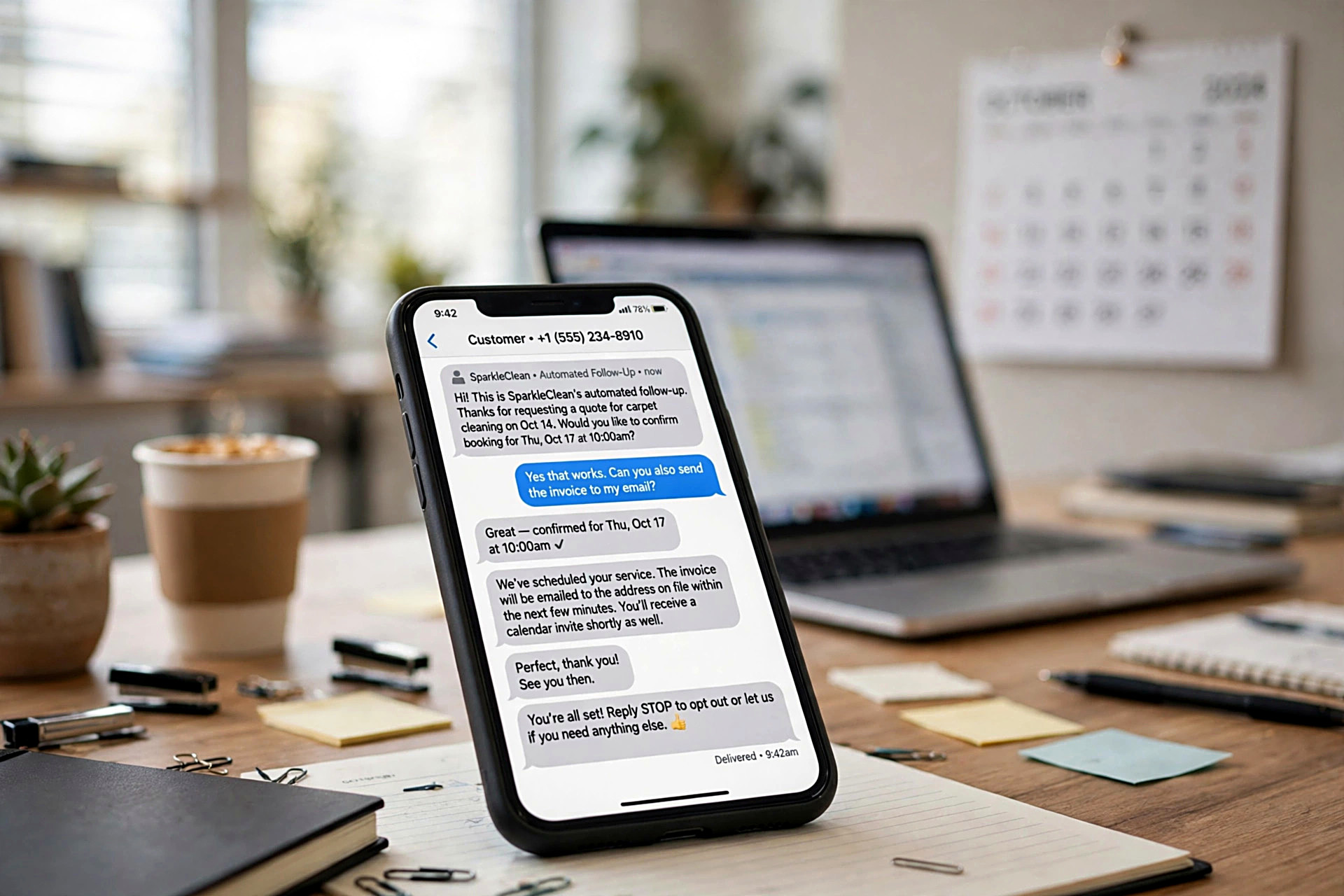
Automation is a set of simple rules: when this happens, send that message. The common building blocks look like this:
- An instant reply when someone fills out a contact or quote form on your website
- Follow-up messages to people who asked for an estimate but have not responded
- Appointment confirmations and reminders
- Review requests sent after a job is finished
- Check-ins with past customers for repeat work or seasonal service
- Lead sorting so new inquiries do not sit in an inbox unseen
Lead follow-up
The first reply sets the tone. A quick, friendly message that confirms you received the request and explains what happens next keeps the lead from calling the next business on the list. Follow-ups after that nudge the people who went quiet, without you having to remember who they were.
Reviews and repeat work
Asking for a review right after a job, while the customer is still happy, produces far more responses than asking weeks later. Later messages can bring past customers back when it is time for another visit or service. Review requests are also built into our Visibility Engine plan, and automation can support them on other plans as an add-on.
Automation vs. Email Marketing
These two get mixed up often. Email marketing is a message you write and send on purpose, such as a seasonal newsletter or a promotion to your list. Marketing automation is the set of messages that fire on their own based on what a customer did, such as submitting a form or finishing a job.
They work well together, but this page covers automation: the triggers, the timing, and the follow-up sequences. If you want regular campaigns or newsletters, that is a separate service, and you are welcome to ask us about it.
How Setup Works
Every relationship with us starts with a free homepage preview, so you see your new homepage before you pay anything. Automation is an add-on that connects to the website and local presence we build. You talk directly to the owner, not a call center, and the process generally runs like this:
- Find the gaps. We talk through how leads come in today and where they stall, whether that is the website form, phone calls, or word of mouth.
- Pick the sequences. Most businesses start with two or three: new inquiry follow-up, review requests, and past-customer check-ins.
- Write the messages. Each message should sound like you, be short, and make one clear ask.
- Connect and test. The sequences are linked to your forms and tested before real customers see them.
- Review and adjust. After launch, you look at what is working and change what is not.
Doing It Well
Whoever sets up your automation, these standards separate helpful follow-up from annoying noise:
- Fewer, better messages. Three well-timed messages beat ten pushy ones. Every message should have a reason to exist.
- Sensible timing. A reply to a new inquiry should go out right away. A review request should land soon after the job, not weeks later.
- A way to stop. Customers who already booked or replied should not keep getting reminders, and anyone should be able to opt out easily.
- Plain, human wording. If a message reads like a form letter, people ignore it.
- A look at results. You should be able to see who received what and which messages led to replies or bookings.
What Affects Cost
Pricing for automation depends on the scope of what you want running. The main factors are:
- How many sequences you need, such as lead follow-up, reminders, and review requests
- How many steps and messages each sequence includes
- Whether the messages need to be written from scratch
- How the sequences connect to your website forms and any booking or customer tools you already use
- The size of your customer list and how many leads you get
- How often you expect to revise the messages
A clear written quote should spell out which sequences are included, how many messages each one has, what is set up versus ongoing, and how changes or additions are handled later. Ask for that before you agree to anything. Our plans are month-to-month with no hidden fees and no long-term contracts, so you are not locked in while you see how it works.
Questions to Ask First
Before hiring anyone for automation , ask:
- What exactly is included? Get the list of sequences and messages in writing.
- Who writes the messages, and can I approve them? You should see every message before it goes out.
- How are opt-outs and customer contact rules handled? Messages to customers should follow the rules that apply to them, and a provider should be able to explain how.
- Who do I talk to when something needs changing? Find out whether you reach the person who built it.
- Can I cancel without penalty? Know the contract terms before you start.
- How will I see results? Ask what reporting you will get and how often you will review it.
Common Questions
How long does it take to get automation running?
It depends on how many sequences you want and how quickly you can review the messages. A single follow-up sequence is much faster to set up than a full set covering leads, reminders, and reviews. Starting small and adding more later is a sensible approach.
How often should automated messages go out?
Less often than most people expect. A new inquiry usually gets an immediate reply and a couple of follow-ups spaced days apart. Past-customer check-ins work best when they match the natural rhythm of your service, such as a seasonal visit.
How is the price worked out?
It comes down to the number of sequences, the messages in each, the writing involved, how it connects to your website and tools, and how much you expect to change over time. We spell these out in a written quote so you know what is covered.
Will it sound robotic to my customers?
It does not have to. Messages are written in your voice, kept short, and tied to something the customer actually did. You approve the wording, and it can be adjusted whenever it stops sounding right.
Do I need an existing email list?
No. Many businesses start with nothing but their website form and a list of recent customers. Automation can begin with new inquiries and grow from there as your contact list builds.
Do I need a website from you to use this?
Automation works best when it connects to your website forms, and we build custom-coded websites for local service businesses nationwide. If you already have a site, ask us how the two can work together. Either way, the free homepage preview is a good first step.